How to Use Fighter’s Free NBME Library and the Medical Library
You can read Fighter’s NBME Library for free with a Step 1 trial account. Use the NBME Library to locate a passage when you’re reviewing a practice block. Use the Medical Library when you need a reference article that explains the topic behind a missed question. If you already have a Fighter account, sign in and open either library from the dashboard.
Free NBME Library
In the dashboard, expand Self Assessments and select NBME Library. You can also open the library directly after signing in. See how to get the free account and start the 48-hour trial. Open the NBME Library in Fighter.
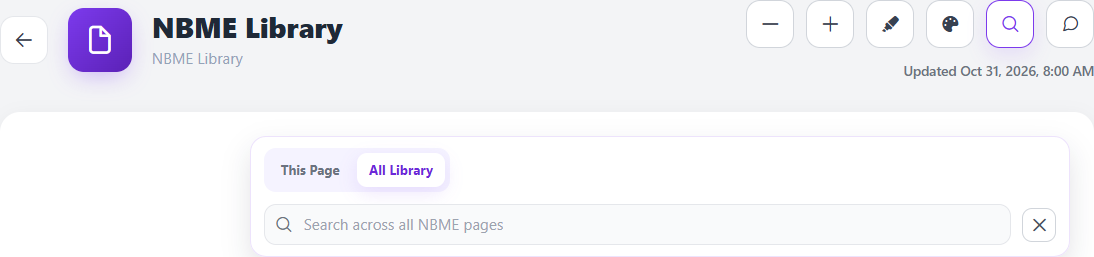
Find a topic across the library, then narrow it down
- Click the magnifying glass in the library header. Choose All Library if you have a topic or phrase and need to find which page contains it.
- Search for one specific term, such as osmolarity. Read the result’s page path and excerpt. Open the one that matches the issue you’re reviewing.
- Switch to This Page to find all mentions within the page you opened. Use the up and down buttons to move between matches. This works well when a term appears in both a heading and an explanation.
- On pages with headings, open Page Index to jump between sections. Use Search Index to filter the headings themselves. Use the breadcrumb at the top to move back to a parent page.
Work an example from your error log
Suppose you recognized the relevant topic but mixed up which variable changes first. In All Library, search the name of that variable and read one result in context. On that page, search the second variable using This Page. Write down the starting condition, the first change, and the expected result in your own words. Then write a one-line question that forces you to recall that sequence tomorrow.
When saving is available for your account, select a short passage to highlight it. Use the palette to mark a key rule and Highlight Only Mode to review your marked passages later. Open Page Index again to return to another section without scrolling through the entire page. The library is a reading and review tool. For an official Step 1 readiness score, use the NBME Comprehensive Basic Science Self-Assessment through MyNBME.
Medical Library
From the dashboard, open Notes and Study and select Medical Library. If your account shows multiple courses, use the course selector to choose the one you’re studying. Expand a subject in the left panel to browse its articles, or search directly for the concept. On mobile, tap Browse library subjects to open the subject list. Open the Medical Library in Fighter.
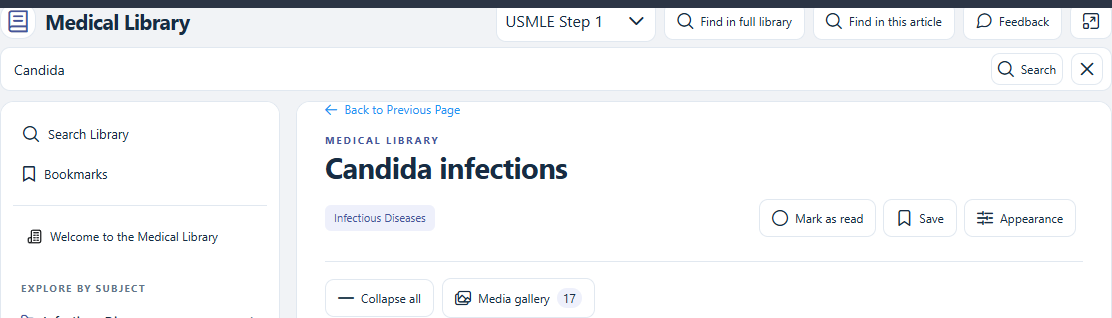
Start with a real question you can answer in five minutes
- Click Find in full library, type Candida, and open Candida infections from the results.
- Once you’re in the article, click Find in this article to look for a narrower keyword. Use the match count and arrow buttons to move through the article, or jump using the headings under the article in the sidebar.
- Ask what the exam vignette adds beyond the organism’s name. Candida can normally be present on the skin and in the gastrointestinal tract. A central venous catheter or neutropenia changes the context for invasive disease. Write one prompt that makes you recall a risk factor and explain why it matters. CDC clinical overview of invasive candidiasis.
- Use Save to add the article to Bookmarks if the result is worth revisiting. Use Mark as read when you’ve finished. If you’re studying from a figure, open Media gallery to find the images gathered from the article.
For a repeat miss, select the part of the passage that answers your question. The selection tools let you work with the highlighted text, including making a brief flashcard where available. Keep the full explanation in the reference article and put the single recall prompt in your deck. See how to turn a missed concept into a flashcard.
Which one should you open after a practice block?
- You remember seeing the discussion on an NBME Library page. Use All Library to locate the page, then This Page to jump to the exact passage.
- You know the topic but can’t explain the underlying idea yet. Find the reference article in Medical Library, read the section that answers your specific question, and close it before trying to explain the idea from memory.
- You can explain the answer while reading but forget it later. Save the reference and make one card with the closest competing answer or mechanism. Test the concept on a new Qbank question a few days later.