How to Use Fighter AI to Find Weak Areas and Build a Quiz
Use Fighter’s AI Test Analysis to look for recurring weak areas in completed tests. Then use the AI Quiz Generator or a recommended custom quiz to build a practice block on one priority. Features and credit usage depend on your course and activity.
Pick a priority from your own results
- Review several completed blocks so you can see more than one session.
- Open AI Test Analysis and compare its suggested priorities with your question counts and performance breakdown.
- Choose a topic that appears repeatedly. If you have attempted very few questions in that topic, practice a few more before drawing a conclusion.
- Use an available recommended quiz or describe your own request to the AI Quiz Generator.
Ask for a quiz you can review today
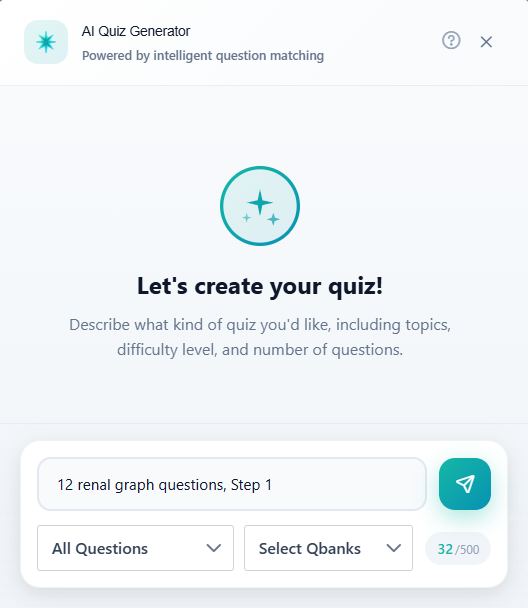
Try “Build a 12-question Step 1 quiz on renal physiology for topic review.” Fighter’s AI Quiz Generator selects questions from the Qbank that match the request. After the block, check whether the scope matched what you meant, then write down the errors that still need practice.
Turn an analysis result into a controlled follow-up
Open Performance, then AI Test Analysis. Pick the course you are using and compare the suggested weak categories with the number of items you have actually answered. A 0/2 result indicates where to look. A 6/18 result across several blocks gives you more evidence for where to spend your next session.
Suppose renal topics appeared across those 18 questions, and the mistakes cluster around interpreting graphs. In Generate Quiz, open the AI generator and ask for “12 unused Step 1 renal physiology questions, prioritizing graphs and interpretation, with moderate difficulty.” Check the generated selection and choose the mode and timing that fit your session. If you get too few matching questions, broaden the topic before increasing the block size. Use the regular filters if you want tighter control over the next block.
After review, run a short mixed block on a different day and keep track of how many interpretations you still get wrong. That gives you a clearer comparison than immediately repeating the same questions. If the analysis page offers a recommended custom quiz, use Start Quiz to run it or Improve Score to revisit an existing recommendation.
Keep the next step specific
If AI Study Plan is available, use it to turn analysis into a set of review tasks. Give the tasks calendar slots in the Study Planner, or use the performance reports to decide whether your plan needs an adjustment after your next blocks.