How to Use the Fighter Study Planner for USMLE Prep
Fighter’s Study Planner gives your preparation a calendar. Start with your exam date and the days you can study, then add separate tasks for quizzes, flashcards, and review. Mark completed work and use what slips to adjust the next week.
Give each task a finish line
“Do renal” leaves too much to decide when you sit down. “Finish a 15-question renal block, review the three hardest questions, and write two flashcards” tells you what to start and when to stop. If the task is too large for the time you have, put the block and the review on separate calendar entries.
Build a week around your availability
- Open Study Planner in the Fighter dashboard and set your exam date and study schedule.
- Put longer question and review sessions on days you can protect. Leave a lighter task for busy days.
- Add a catch-up slot for unfinished work and a weekly checkpoint to decide what comes next.
- After each session, mark what you completed. Move only the tasks that still matter and reduce the size of recurring tasks if they keep running long.
Choose between a generated plan and Max Flex
Open Study Planner from Notes and Study. Choose Select Study to schedule components such as Practice Questions and Flashcards. Choose Max Flex if you already have your own timetable and want to start from an empty calendar. Enter your study window and mark dates you cannot study before generating the plan. Check the first seven days for days that are too full.
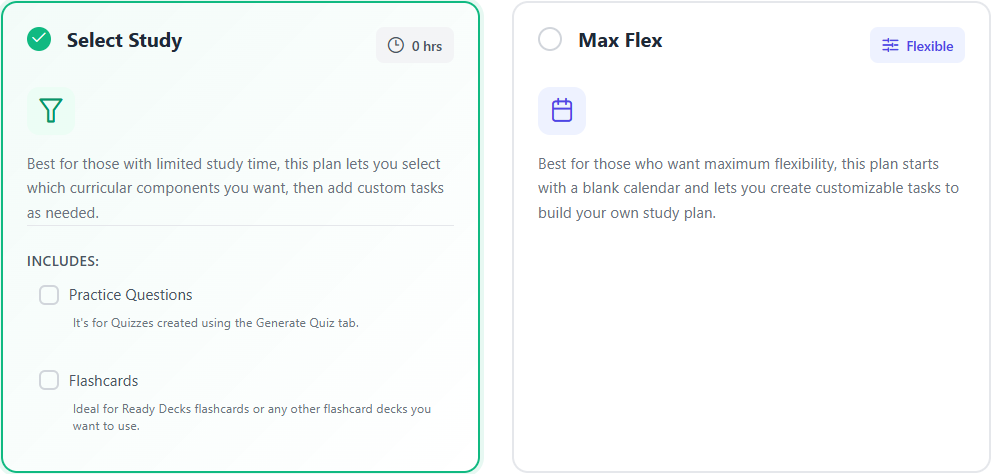
Here is a useful Max Flex week when your shifts change. Put a 20-question timed block and its review on Sunday. On Tuesday, use Add Task for 20 minutes of retrieval on your two most frequent errors. On Thursday, schedule a fresh mixed block. Leave Friday open for one unfinished task. At the end of the week, record which activity moved forward and which kept being rescheduled.
When a day slips, open the calendar and move the unfinished task to a genuinely open slot. If you cannot fit both the quiz and its review, shorten the next quiz. If you need to change a plan, review the existing tasks first. The restart action warns that it deletes progress and custom tasks for that plan type.
Update the calendar when your evidence changes
If your last two blocks show the same weak topic, replace one lower-priority task with a focused set and a follow-up review. Use the six-week Step 1 schedule as a starting point, and check the Fighter performance reports when you plan your next adjustments.